
The buffer allows you to accept additional online requests without having to confirm them immediately. Reservations that exceed the regular online bookable capacity are captured as provisional and can be reviewed in the backend.
What the buffer is used for
The buffer acts as a safety reserve per shift:
-
You can allow more demand without directly overbooking
-
Additional online reservations are not automatically confirmed
-
The restaurant always keeps full decision-making control
Typical use cases include:
-
Uncertain occupancy (e.g. weather, terrace seating)
-
Expected cancellations
-
Flexible table combinations
-
Operational fine-tuning by the team
Where to find the settings
The buffer is configured per shift:
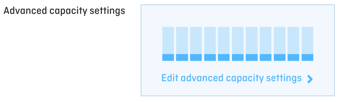
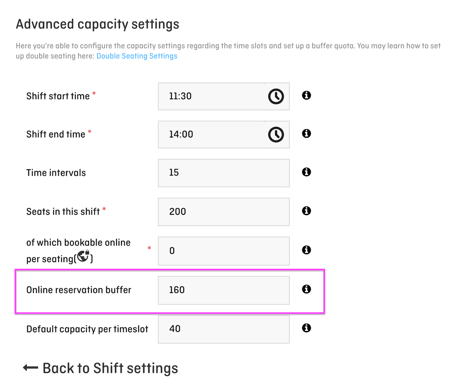
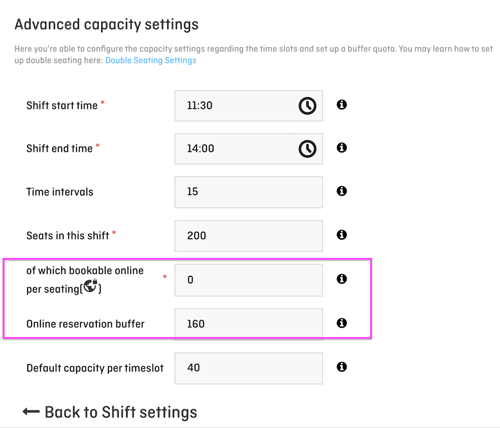
Settings → Shifts → Select shift → Advanced capacity settings → Buffer
Here, you define how many additional seats are available as buffer capacity for that shift.
What guests see in the widget
In the widget, there is a clear visual indicator:
Time slots with a frame
→ The reservation is expected to be provisional, as it is coming from the buffer
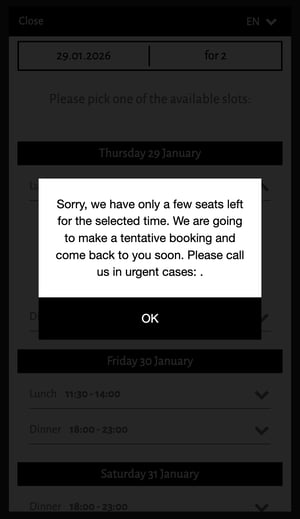
When submitting the reservation, the guest also receives a notice / pop-up stating that:
-
the request has not yet been confirmed
-
the restaurant will review the reservation first
This makes it transparent for guests that their booking is a provisional request.
What happens in the backend
As soon as a reservation is created via the buffer:
-
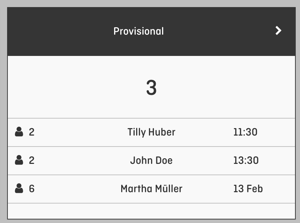
The guest automatically receives the “Provisional” email template
-
The reservation appears in the system with the status “Provisional”
-
The restaurant decides how to proceed:
-
Confirm → the guest receives a confirmation
-
Decline → the guest receives a rejection
-
The status can be updated:
-
via the Dashboard (box “Provisional”)
-
or directly in SeatIn / BooqIn
💡 Note: Capturing only provisional online reservations
Some restaurants prefer to manually review every online reservation before confirming it — for example when working with highly individual table layouts, strongly fluctuating availability, or complex operational processes.
In this case, the buffer can be used intentionally:
-
Set online capacity to 0
-
Define a sufficiently high buffer
This ensures that all online requests are automatically captured as provisional.
The restaurant then decides in the backend whether to confirm or decline each request.
Summary
-
The buffer is a deliberate reserve for additional online demand
-
Guests clearly see when a reservation is provisional only
-
The restaurant keeps full control over confirmations and declines
-
Ideal for more flexibility in daily operations — without risk