
1 What are merge tags?

Merge tags can be used to collect and process data or information on an individual level. Merge tags are used in text templates for e.g. reservation confirmations as placeholders if the information varies individually, e.g. the reservation time or the name of the guest.
For example, in automated emails, the merge tag for the first name - in aleno {{CustomerFirstName}} - each guest can be personally addressed by their first name. In the e-mail, the first name of the recipient of the mail is inserted in the place of the merge tag.
Example: If you want to address the guest by first name in the confirmation email, you set the merge tag with the value FirstName instead of the first name in the email template for the reservation confirmation. In the aleno system this merge tag is called {{CustomerFirstName}} . After each reservation the guest will be addressed with the first name in the automatic confirmation mail, e.g. Hello Frank. There are many different merge tags available for personalizing automatic mails.
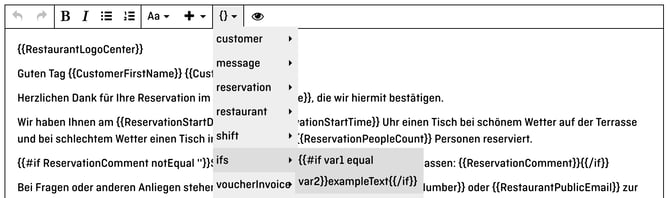
You can find the merge tags in the email template settings by the swung brackets.
1. 2 How do you use Merge Tags?
Merge Tags can be used directly in your email templates to automatically add information related to the respective guest or reservation.
Go to Settings → Email → Templates and open the email template you would like to edit. Place the cursor where you want to insert the information and select the appropriate Merge Tag via the curly brackets icon.
For example, if you want to use the guest's first name, insert the following Merge Tag:
{{CustomerFirstName}}
This:
Hello {{CustomerFirstName}}
will automatically become, for example:
Hello Frank
You can also combine multiple Merge Tags, for example:
Hello {{CustomerFirstName}} {{CustomerLastName}}
When the email is sent, the Merge Tags are automatically replaced with the corresponding information from the reservation.
1.2 Form of address
With only two steps you can give your guest the option to choose the salutation:
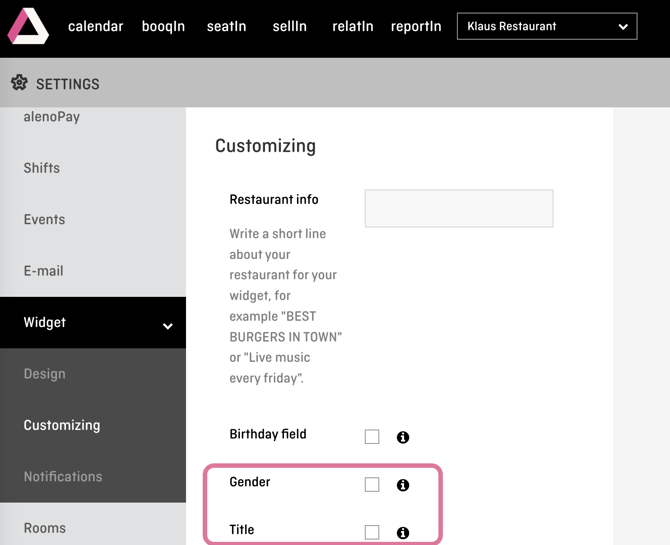
1. Activate the salutation option in the settings under Widget -> Customizations:
2. Embedding the gender if-conditions in the settings under E-mail -> Templates:
{{#if CustomerSex equal 'male'}}Dear Mr. {{CustomerTitle}} {{CustomerLastName}},{{/if}}
{{#if CustomerSex equal 'female'}}Dear Ms. {{CustomerTitle}} {{CustomerLastName}},{{/if}}
{{#if CustomerSex equal 'other'}}Dear He/She {{CustomerTitle}} {{CustomerFirstName}} {{CustomerLastName}},{{/if}}
{{#if CustomerSex equal ''}}Dear )Mr. / Mrs. / Herr {{CustomerTitle}} {{CustomerLastName}},{{/if}}
{{#if CustomerSex equal 'preferNotSay'}}Dear beautiful Soul {{CustomerTitle}} {{CustomerLastName}},{{/if}}
2 If-conditions
The If statement is nothing more than a condition. Only if the condition is met, a command or an action is triggered. You can set up an if-statement in the email template or also in other text fields in aleno.
When are if-conditions useful? For example, if you want to send a different confirmation text for reservations for certain shifts, e.g. if the confirmation email for reservations for the terrace (=shift "Terrace") should be supplemented with a nice weather note.
2.1 How is the command structured?
The command starts with the keyword #if and is terminated with the keyword /if. These keywords are set automatically by aleno. So you don't have to enter them manually.
The basic command looks like this:

For var1 you have to insert a merge tag from the list, e.g. shift name. You can find the selection of if-stateconditions and merge tags in the email template settings at the swung brackets (see above).
For var2 you then put the specific value where the condition is met or the command should be executed. In this example it would be the name of the respective shift, e.g. 'Terrace'.
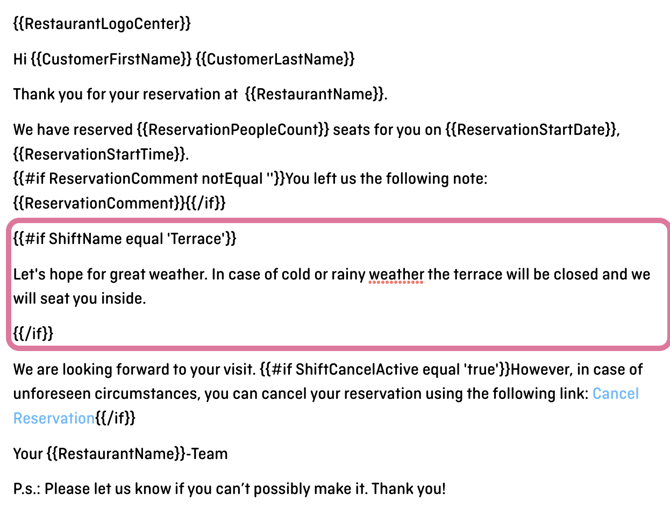
This is how it looks then (you may copy this if-rule a little further down):
What do you have to keep in mind:
1) Delete swung brackets of the merge tag (var1) in the if-statement, as in the above example for ShiftName.
2) The specific value (var2) must be enclosed in quotes, like 'Terrace' in the above example.
The text outside the if-condition is displayed for every reservation confirmation. The text inside the if-statements additionally for reservations that meet the conditions. In the example above for reservations for the terrace.
{{#if ShiftName equal 'Terrasse'}}
Let's hope for great weather. In case of cold rainy weather the terrace will be closed and we will seat you inside.
{{/if}}
IMPORTANT: If, for example, a completely different text is to be sent depending on the shift, all text sections that refer to a specific shift must each be set within an if command.
2.2 Combining if-conditions
If-conditions can be combined with each other. It is only important that the correct if-terminations (/if) are stored.
Here is an example (note the color-coded if-statements including their terminations):
{{#if ReservationPeopleCount greaterOrEqual '3'}}
{{#if ShiftName equal 'Brunch'}}
{{#if ReservationStartTime lessOrEqual '10:45'}}
this text should show for 3 or more persons but only in brunch before 11
{{/if}}
{{/if}}
{{/if}}
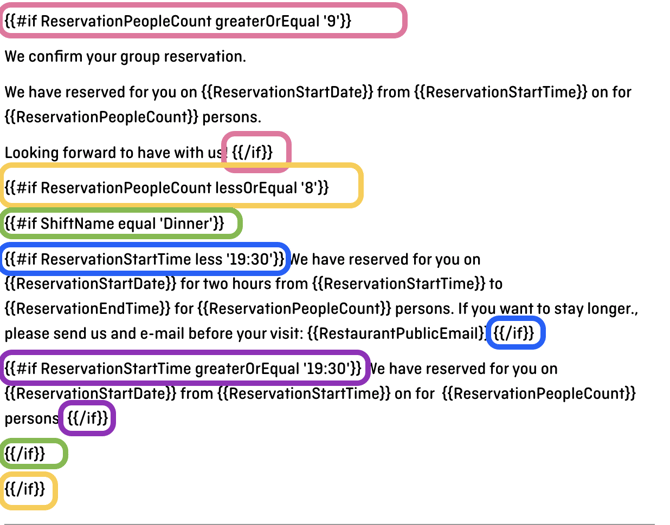
When if-conditions are combined, they operate as an AND function. This means that all conditions must be true at the same time for the command to execute. Unfortunately, combining them as an OR function is not possible.
Example:

-> The conditions of NOT being in the "Christmas Eve" shift AND NOT being in the "Christmas Day" shift can be true at the same time.

The conditions of being in the "Christmas Eve" shift and in the "Christmas Day" shift cannot be true at the same time.
Glossary Merge Tags
Here is a glossary of merge tags as well as if-statements which can be used in aleno:
Guest Information
| Merge Tag | Description | Relevant Example |
|---|---|---|
CustomerCity |
City of the guest | {{CustomerCity}} → e.g. Zurich |
CustomerCode |
Postal code of the guest | {{CustomerCode}} → e.g. 8001 |
CustomerCompany |
Company stored in the guest profile | {{CustomerCompany}} → e.g. aleno AG |
CustomerCountry |
Country of the guest | {{CustomerCountry}} → e.g. Switzerland |
CustomerEmailVerificationLink |
Link to verify the guest's email address, e.g. for walk-ins | Can be used as a link in a verification email: {{CustomerEmailVerificationLink}} |
CustomerFirstName |
First name of the guest | Hello {{CustomerFirstName}} → Hello Anna |
CustomerId |
Unique technical ID of the guest profile | {{CustomerId}} – mainly relevant for technical or internal use cases |
CustomerIsEmailConfirmed |
Indicates whether the guest's email address has been confirmed | {{#if CustomerIsEmailConfirmed equal 'true'}}...{{/if}} |
CustomerIsPhoneConfirmed |
Indicates whether the guest's phone number has been confirmed | {{#if CustomerIsPhoneConfirmed equal 'true'}}...{{/if}} |
CustomerLastName |
Last name of the guest | {{CustomerFirstName}} {{CustomerLastName}} → Anna Muster |
CustomerPhoneVerificationLink |
Link to verify the guest's phone number, e.g. for walk-ins | {{CustomerPhoneVerificationLink}} |
CustomerSex |
Selected salutation / gender information of the guest | {{#if CustomerSex equal 'female'}}Dear Ms. {{CustomerLastName}},{{/if}} |
CustomerState |
State, canton or region of the guest | {{CustomerState}} → e.g. Zurich |
CustomerStreet |
Street / address of the guest | {{CustomerStreet}} |
CustomerTags |
Tags stored in the guest profile. These are particularly useful for if-conditions and should generally not be displayed directly to guests. | {{#if CustomerTags contains 'VIP'}}Welcome back!{{/if}} |
CustomerTitle |
Academic title of the guest | {{CustomerTitle}} → e.g. Dr. |
CustomerVisitCount |
Number of past reservations of the guest | {{#if CustomerVisitCount greater '3'}}Welcome back!{{/if}} |
Restaurant Information
| Merge Tag | Description | Relevant Example |
|---|---|---|
RestaurantAddress |
Address / street of the restaurant | {{RestaurantAddress}} |
RestaurantCity |
City of the restaurant | {{RestaurantCity}} |
RestaurantId |
Unique technical ID of the restaurant | {{RestaurantId}} |
RestaurantLogo |
Restaurant logo stored in the widget settings | {{RestaurantLogo}} inserts the restaurant logo into the email |
RestaurantLogoCenter |
Inserts the restaurant logo centred | Often used at the beginning of an email template: {{RestaurantLogoCenter}} |
RestaurantName |
Name of the restaurant | Thank you for your reservation at {{RestaurantName}}. |
RestaurantPhoneNumber |
Phone number of the restaurant | If you have any questions, please contact us at {{RestaurantPhoneNumber}}. |
RestaurantPublicEmail |
Public email address stored in the restaurant's general settings | {{RestaurantPublicEmail}} |
RestaurantSenderEmail |
Sender email address stored in the email configuration | {{RestaurantSenderEmail}} |
RestaurantZipCode |
Postal code of the restaurant | {{RestaurantZipCode}} {{RestaurantCity}} |
Reservation Information
| Merge Tag | Description | Relevant Example |
|---|---|---|
ReservationAddGuestDataLink |
Link that allows additional guest data to be added to a reservation | Please add the details of your guests here: {{ReservationAddGuestDataLink}} |
ReservationAddToCalendarLink |
Link that allows the guest to add the reservation to their calendar | Add reservation to calendar: {{ReservationAddToCalendarLink}} |
ReservationAdditionalQuestions |
Displays the additional questions answered during the reservation, including the corresponding answers | {{ReservationAdditionalQuestions}} Known limitation: Checking whether this Merge Tag contains data using notEqual '' currently does not work reliably due to a known bug. |
ReservationBasket |
Displays an overview of Sell Items selected and already paid for as part of the reservation | {{ReservationBasket}} can be used to list the selected and paid items. See also the Sell Items Knowledge Base article. |
ReservationCancelLink |
Cancellation link for the guest | Particularly useful together with ShiftCancelActive: {{#if ShiftCancelActive equal 'true'}}Cancel your reservation: {{ReservationCancelLink}}{{/if}} |
ReservationCategoryName |
Category assigned to the reservation | {{ReservationCategoryName}} |
ReservationCode |
Reservation code | {{ReservationCode}} |
ReservationComment |
Comment stored with the reservation | {{#if ReservationComment notEqual ''}}You left us the following note: {{ReservationComment}}{{/if}} |
ReservationCreditCardLink |
Link for entering credit card details when a credit card is requested afterwards for a No-Show guarantee. Used in particular in the CC Requested email template under Email → Payments. | The text Your Credit Card Now can be linked using {{ReservationCreditCardLink}}. |
ReservationCreditCardLinkExpirationTime |
Indicates how many hours the credit card link remains valid | To complete your reservation, please provide your credit card details within {{ReservationCreditCardLinkExpirationTime}} hours. |
ReservationDesiredRoom |
Desired room / area specified for the reservation | {{#if ReservationDesiredRoom contains 'ZunftStube'}}Your reservation is for the indoor area.{{/if}} |
ReservationDurationMin |
Duration of the reservation in minutes | {{ReservationDurationMin}} → e.g. 120 |
ReservationEndDate |
End date of the reservation | {{ReservationEndDate}} |
ReservationEndTime |
End time of the reservation | {{ReservationEndTime}} → e.g. 22:30 |
ReservationId |
Unique technical ID of the reservation | {{ReservationId}} – mainly relevant for technical or internal use cases |
ReservationPeopleCount |
Number of guests in the reservation | {{#if ReservationPeopleCount greaterOrEqual '6'}}For groups of 6 or more, our group menu applies.{{/if}} |
ReservationReconfirmationLink |
Link that allows the guest to reconfirm an existing reservation. Particularly useful in reminder emails or SMS messages. | Please reconfirm your reservation here: {{ReservationReconfirmationLink}} |
ReservationSelfEditLink |
Link that allows the guest to edit their reservation themselves | {{#if ReservationSelfEditLink}}If you would like to make changes to your reservation, you can edit it here: {{ReservationSelfEditLink}}{{/if}} |
ReservationSellItemsLink |
Link to the Sell Items checkout for an existing reservation. The guest can select and purchase available items and complete the reservation. Used in particular in the Payments Items Requested email template. | The text Finish your reservation now can be linked using {{ReservationSellItemsLink}}. |
ReservationStartDate |
Start date of the reservation. The displayed format depends on the restaurant-level date configuration. | Your reservation is on {{ReservationStartDate}}. Important for if-conditions: date values are compared as text. Formats such as YYYY-MM-DD are therefore required for reliable greater/less comparisons. |
ReservationStartTime |
Start time of the reservation | {{#if ReservationStartTime lessOrEqual '18:30'}}Your table is available for two hours.{{/if}} |
Summary of Multiple Reservations
| Merge Tag | Description | Relevant Example |
|---|---|---|
ReservationsSummary |
Inserts an overview of multiple reservations of a guest into the Reservation Summary email template. This is particularly useful when a guest has several reservations within a short period of time. If several linked restaurants share the same guest database, reservations from different restaurants can also be included. | {{ReservationsSummary}} must be included under Settings → Email → Templates → Reservation Summary. More information: Reservation Summary Email |
Shift Information
| Merge Tag | Description | Relevant Example |
|---|---|---|
ShiftCancelActive |
Returns true or false depending on whether guest cancellation is enabled for the respective shift |
{{#if ShiftCancelActive equal 'true'}}Cancel your reservation: {{ReservationCancelLink}}{{/if}} |
ShiftDaysAdvance |
Number of days in advance the shift can be booked | {{ShiftDaysAdvance}} |
ShiftId |
Unique technical ID of a shift. Particularly useful if several shifts have the same name. | {{#if ShiftId equal 'abc123'}}This text is only shown for this specific shift.{{/if}} |
ShiftMaxPersons |
Maximum number of guests that can be booked in the shift | {{ShiftMaxPersons}} |
ShiftMinPersons |
Minimum number of guests required for a reservation in the shift | {{ShiftMinPersons}} |
ShiftName |
Name of the booked shift | {{#if ShiftName equal 'Terrace'}}We look forward to welcoming you on our terrace.{{/if}} |
ShiftSpecialConditionsMailText |
Email text for special conditions stored in the shift settings | {{ShiftSpecialConditionsMailText}} displays the text stored for the respective shift |
Voucher Information
| Merge Tag | Description | Relevant Example |
|---|---|---|
VoucherAmount |
Amount / value of the purchased voucher | Voucher value: {{VoucherAmount}} {{VoucherCurrency}} |
VoucherCode |
Voucher code / voucher number | Your voucher code is {{VoucherCode}}. |
VoucherCurrency |
Currency of the voucher | {{VoucherCurrency}} → e.g. CHF |
VoucherDescription |
Description of the voucher | {{VoucherDescription}} |
VoucherPrice |
Price / value of the voucher | {{VoucherPrice}} {{VoucherCurrency}} |
VoucherPurchaserFirstName |
First name of the person who purchased the voucher | Hello {{VoucherPurchaserFirstName}} |
VoucherPurchaserLastName |
Last name of the person who purchased the voucher | {{VoucherPurchaserFirstName}} {{VoucherPurchaserLastName}} |
VoucherUrl |
Link to download the purchased voucher as a PDF | Download your voucher: {{VoucherUrl}} |
VoucherValidTo |
Date until which the voucher is valid | This voucher is valid until {{VoucherValidTo}}. |
Additional / specific for guests informations via if conditions
| If Condition | Description | Relevant Example |
|---|---|---|
{{#if var1 contains 'var2'}}...{{/if}} |
Checks whether a value contains a specific value or text | {{#if CustomerTags contains 'VIP'}}...{{/if}} |
{{#if var1 equal 'var2'}}...{{/if}} |
Checks whether a value exactly matches another value | {{#if ShiftName equal 'Terrace'}}...{{/if}} |
{{#if var1 notEqual 'var2'}}...{{/if}} |
Checks whether a value does not match another value | {{#if ReservationComment notEqual ''}}...{{/if}} |
{{#if var1 greater 'var2'}}...{{/if}} |
Checks whether a value is greater than the comparison value | {{#if CustomerVisitCount greater '3'}}...{{/if}} |
{{#if var1 greaterOrEqual 'var2'}}...{{/if}} |
Checks whether a value is greater than or equal to the comparison value | {{#if ReservationPeopleCount greaterOrEqual '6'}}...{{/if}} |
{{#if var1 less 'var2'}}...{{/if}} |
Checks whether a value is less than the comparison value | Can be used for numerical values or times |
{{#if var1 lessOrEqual 'var2'}}...{{/if}} |
Checks whether a value is less than or equal to the comparison value | {{#if ReservationStartTime lessOrEqual '18:30'}}...{{/if}} |
{{#if var1}}...{{/if}} |
Checks directly whether a value exists / is available. For suitable Merge Tags, no equal 'true' condition is required. |
{{#if ReservationSelfEditLink}}Edit your reservation: {{ReservationSelfEditLink}}{{/if}} |
{{#if var1 contains 'var2'}}...{{else}}...{{/if}} |
Displays one content if the condition is met and alternative content if it is not met. |
|
Important Notes on If Conditions
If conditions can be nested. When several if conditions are nested, they work as an AND condition. This means that all conditions must be true at the same time.
For example:
{{#if ReservationPeopleCount greaterOrEqual '3'}}
{{#if ShiftName equal 'Brunch'}}
{{#if ReservationStartTime lessOrEqual '10:45'}}
This text is only shown for reservations with at least 3 guests, in the Brunch shift, at or before 10:45.
{{/if}} {{/if}} {{/if}}
Using several different ShiftId conditions inside each other therefore does not create an OR condition:
ShiftId = A AND ShiftId = B AND ShiftId = CA reservation can only belong to one of these shifts, so this condition can never be true.
Important Note on Date Comparisons
Date values are currently not handled as true date values by relational operators such as greater, greaterOrEqual, less or lessOrEqual. They are compared as text instead.
For example, a format such as:
16.10.2026cannot be reliably compared using greater/less conditions.
A sortable format such as:
2026-10-16works correctly because the values are ordered chronologically when compared as text.
The date format is configured on restaurant level.
Checking Whether a Merge Tag Contains Content
For many Merge Tags, you can check whether a value exists by comparing it with an empty value:
{{#if ReservationComment notEqual ''}} You left us the following note: {{ReservationComment}} {{/if}}For Merge Tags that return a Boolean value, you can compare against true:
{{#if ShiftCancelActive equal 'true'}} Cancel your reservation: {{ReservationCancelLink}} {{/if}}Some Merge Tags can also be checked directly:
{{#if ReservationSelfEditLink}} If you would like to make changes to your reservation, you can edit it here: {{ReservationSelfEditLink}} {{/if}}Hint box
💡 Tip: Show alternative content with {{else}}
With {{else}}, you can define what should be displayed when an if-condition is not met.
{{#if ShiftName contains 'Brunch'}} We look forward to welcoming you for brunch. {{else}} We look forward to welcoming you. {{/if}}In this example, the first text is shown when the shift name contains “Brunch”. For all other shifts, the text after {{else}} is displayed instead.