
Übersicht
When and why table priorities are useful
Table priorities are helpful whenever multiple suitable tables are available, but you don’t want table assignment to depend on chance or table numbering.
Typical real-life use cases include:
-
Filling areas in a targeted way
e.g. filling the back room first to keep service routes short
-
Deliberately controlling attractive tables
e.g. using window tables later or only for specific guests
-
Avoiding disruption during service
e.g. preventing constant switching between different zones
-
Reflecting room logic without daily manual changes
e.g. using terraces or side rooms only when needed
💡 Keep in mind:
Table priorities do not replace a capacity concept – they fine-tune placement when multiple options are possible.
What table priorities are and where they are defined
Table priorities allow you to control which tables or areas are preferred when more than one suitable option is available.
Important to understand:
Prioritisation can be defined in multiple places, and these do not have equal weight.
They are applied in a clear hierarchy.
In general:
-
Table priorities are defined on restaurant level
(Settings > General > Automatic Table Assignment) -
They apply automatically to all shifts, but can be adjusted on shift or day level
-
Prioritisation only applies when multiple suitable tables are available
How prioritisation is applied in multiple places
Priorisierung kann auf drei Ebenen entstehen:
-
Explicit table priorities
→ Settings > General > Automatic Table Assignment > Table Priorities
→ Always take precedence when defined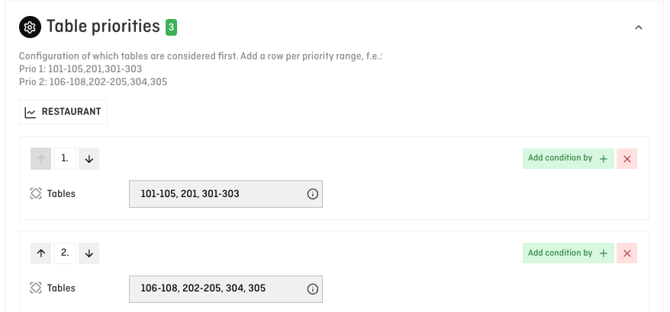
-
Order of table capacities and table combinations
→ Settings > General > Automatic Table Assignment > Table Capacities and Combinations
→ The order of rows (top to bottom) matters
→ Used when no matching table priority applies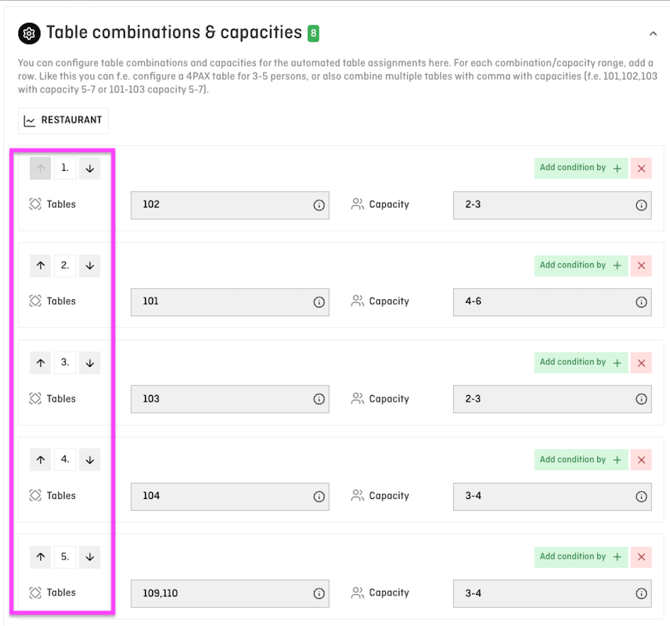
-
Table numbering
→ Final fallback logic (table 1 before table 2, etc.)
→ Used when neither priorities nor a relevant capacity order exist
These levels are applied hierarchically, not in parallel.
ℹ️ Note:
As soon as you define anything in the Table Priorities section, this configuration overrides the prioritisation derived from the order of capacities and combinations.
How the system decides without explicit prioritisation
f you do not define any table priorities, the system works as follows:
1. Matching table size first
-
A reservation for 3 guests is preferably placed on a table configured for exactly 3 pax
-
Only then are tables configured for 3–4 pax considered
2. Order of table capacities and combinations
-
The top row is evaluated first
3. No further information available
→ Tables are assigned based on table numbering
(table 1, then 2, then 3, …)
Using table priorities effectively – step by step
The Table Priorities section is especially useful when you want to explicitly control which tables are considered first – independently of capacity logic.
This is typically done using areas or zones.
Example of a clean configuration
Configuration of which tables are considered first.
Create one row per priority, for example:
-
Priority 1:
101–105, 201, 301–303 -
Priority 2:
106–108, 202–205, 304, 305
The top row always has the highest priority.
Only if no suitable table is available there will the next priority be considered.
Steps
-
Open Settings > General > Automatic Table Assignment > Table Priorities
-
Click Create new
-
Enter the tables for one priority per row
-
Use the arrows to adjust the order after entering the tables
-
Save
💡 Tip:
Once table priorities are defined, they take precedence over the order of table capacities and combinations.
Typical questions and pitfalls
Why is a table priority not applied?
→ Check whether the table is fundamentally suitable for the reservation
(capacity, exclusion, combination).
Can I completely avoid using table priorities?
→ Yes. In that case, placement is controlled by the order of capacities and combinations.
What is the overall decision order at a glance?
-
Table capacities and combinations
-
Table exclusions
-
Order of capacities and combinations
-
Table priorities
-
Table numbering
⚠️ Important:
The Table Priorities section is optional.
A complete prioritisation can also be achieved exclusively through the order of table capacities and combinations.