
Overview
What reservation prioritisation means
 Die
Die
Reservation prioritisation defines the order in which reservations are checked and assigned to tables when multiple reservations need to be considered at the same time.
Important to understand:
Reservations are always assigned to a table immediately when they are created.
Prioritisation is therefore not a rule for incoming bookings, but a base logic that applies when reservations need to be reordered or reassigned.
When reservation prioritisation applies
The order of reservations becomes relevant when:
-
“Automatically move reservations” is enabled
-
existing reservations are reassigned
-
multiple reservations are temporarily without a table
Typical real-life cases:
-
You remove all reservations from their tables in SeatIn and let the system reassign them in one go
-
The system shifts existing reservations to make room for a new situation
⚠️ Attention:
Two online reservations arriving at the exact same second are extremely unlikely.
Reservation prioritisation is therefore not about competing bookings, but a sorting logic for reassignment scenarios.
Understanding the standard prioritisation
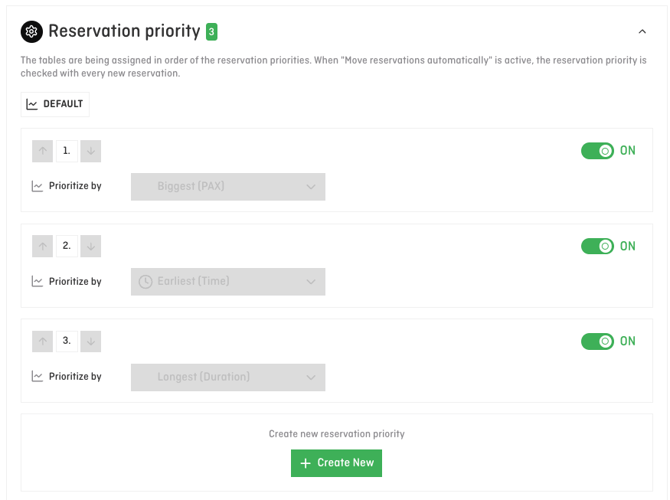
By default, the system uses the following order:
-
Largest group (PAX)
-
Earliest start time
-
Longest duration
This means:
-
Larger groups are placed first
-
If group size is the same, earlier reservations are prioritised
-
If start time is the same, longer reservations are prioritised
This logic ensures that:
-
more complex reservations are secured first
-
overall occupancy remains stable and predictable
ℹ️ Note:
This standard logic is always active unless another prioritisation is explicitly defined.
Typical real-life situations
Example 1:
You remove all reservations from their tables in the afternoon to restructure the floor plan and let the system reassign them automatically.
→ Larger groups are placed again first.
Example 2:
“Automatically move reservations” is active and a new reservation comes in or an existing reservation is cancelled.
→ The system checks existing reservations in the defined order and shifts those with lower priority first.
💡 Tip:
Reservation prioritisation ensures a clear and reliable base logic, even when you intervene operationally or reorganise situations.
What’s next?
In addition to the standard logic, you can also actively influence the prioritisation order, for example based on guest tags or other criteria.
The concrete setup options and practical examples are explained in a separate article.