
Overview
What does “automatically moving reservations” mean?
When this option is active, the automatic table assignment is allowed to reorganise already assigned reservations if the situation changes – for example due to new bookings or cancellations.
The goal is to use better-fitting tables and free up capacity for additional reservations, without manual work.
You can also define whether reservations may only be moved within specific rooms or across all available rooms.
ℹ️ Note:
-
Only automatically assigned reservations can be moved.
-
Manually placed reservations are never moved.
Where do you configure automatic moving?
The feature is activated on restaurant level,
but the key setting – the time limit – is defined per shift.
Step by step
-
Open Settings > General > Automatic Table Assignment
-
Select the desired automation mode
-
Activate Automatically move reservations
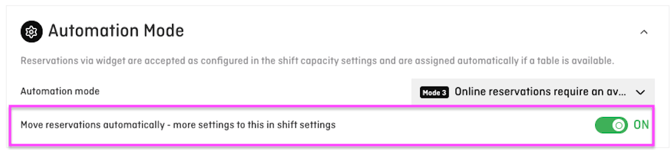
- Select the rooms within which reservations may be moved automatically

- Go to Settings > Shifts
- Open the relevant shift
- Scroll to Automatic Table Assignment
- Define the reassignment time limit (in minutes)
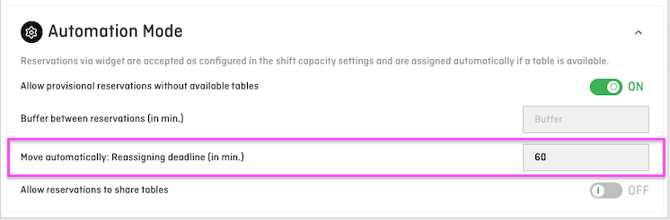
Within which rooms can reservations be moved?
When Automatically move reservations is activated, an additional dropdown menu is displayed.
This allows you to prevent reservations from being moved automatically between different rooms without your visibility or control – for example from the terrace to the restaurant.
The following options are available:
Assigned and desired rooms
Automatic table reassignments are restricted to:
- the room currently assigned to the reservation
- the reservation’s desired room
Example:
A reservation is currently assigned to the restaurant, while the terrace is saved as its desired room.
The system may move the reservation within the restaurant or to the terrace, but not to another available room.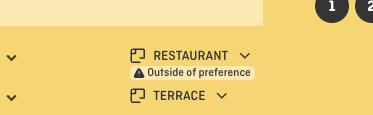
Assigned room only
The reservation may only be moved within the room to which it is currently assigned.
Example:
A reservation is assigned to the terrace.
The system may select a better-fitting table on the terrace, but it cannot move the reservation into the restaurant.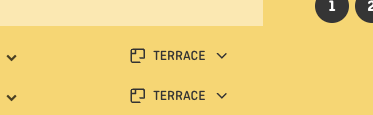
All available rooms
The reservation may be moved automatically across all available rooms.
This is the default setting and corresponds to the previous behaviour.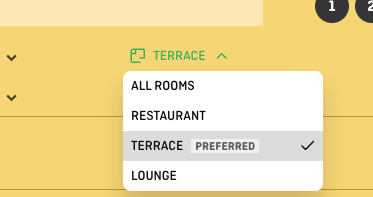
ℹ️ Additional notes:
- Priorities, exclusions, and table combinations defined in the automatic reassignment logic continue to be respected.
- If a reservation has not yet been assigned to a table, it can be assigned automatically to a table in any available room.
- If a reservation is assigned to tables in two different rooms, automatic reassignment is only allowed within those two rooms.
What does the “reassignment time limit” mean?
The time limit defines how many minutes before the reservation start the system is still allowed to move a reservation.
Example:
-
Time limit = 60 minutes
→ From 60 minutes before the reservation starts, the table assignment is fixed.
⚠️ Important:
Once the time limit is reached, no automatic reassignment takes place, even if a better table becomes available.
Practical example: automatic moving after a cancellation
A typical real-world scenario:
-
A reservation for 5 guests is created
→ It is placed at a 6-seat table -
Later, a reservation for 6 guests is created
→ It is placed on a table combination, because no 6-seat table is free -
The 5-guest reservation is cancelled
→ The 6-seat table becomes available -
In your settings, you have defined:
→ Single 6-seat tables have higher priority than table combinations -
The system reacts automatically:
→ The 6-guest reservation is moved from the table combination to the free 6-seat table,
as long as the reassignment time limit has not been reached and the table is within the permitted room scope.
💡 Result:
-
The table combination becomes available again
-
The room layout stays clean and logical
-
You gain flexibility for further reservations
Common questions & pitfalls
Why isn’t a reservation moved after a cancellation?
Possible reasons:
-
The reassignment time limit has already been reached
-
The reservation was placed manually
-
No higher-priority table option is available
- The better-fitting table is outside the permitted room scope
Can reservations still be moved during service?
Yes – as long as the time limit allows it.
Using a shorter time limit prevents changes during active service.
Can a reservation be moved from the terrace to the restaurant?
This depends on the selected setting.
With All available rooms, the reservation may be moved between all available rooms.
With Assigned room only, the reservation remains within its currently assigned room.
With Assigned and desired rooms, the reservation may only be moved within the currently assigned room and the desired room.
What happens if no table has been assigned yet?
If a reservation has not yet been assigned to a table, it can be assigned automatically to a table in any available room.
The room restriction only applies to later automatic movements of an already assigned reservation.
Do I need to set the time limit for every shift?
No. If no limit is entered, the system will allow to move reservation up until their start time.