
Overview
Why creating your own reservation priorities makes sense
Custom reservation priorities help you actively control which reservations are considered first when reservations are reassigned.
This allows you to reflect your service logic without constantly intervening manually during daily operations.
Typical goals:
-
placing important guests first
-
securing specific reservation types or time slots
-
creating clear rules for automatic reassignments
How standard and custom priorities work together
By default, the following standard priorities are active:
-
Largest group (PAX)
-
Earliest start time
-
Longest reservation duration
You can deactivate each of these individually.
The evaluation always follows this order:
-
All active standard priorities (from top to bottom)
-
Your custom priorities (also from top to bottom)
ℹ️ Note:
Custom priorities do not automatically replace the standard logic. They apply below the active standard rules or take over their role if individual standard priorities are disabled.
Which reservation priorities you can create
Du kannst eigene Prioritäten anhand folgender Kriterien definieren:
You can create custom priorities based on the following criteria:
-
Number of guests (PAX)
– smallest or largest group first -
Reservation creation time
– oldest or newest reservation first -
Reservation start time
– earliest or latest time first -
Reservation duration
– shortest or longest duration first -
Guest tags
– e.g. VIP, regular guest, in-house guest
Creating your own reservation priorities – step by step
-
Go to Settings > General > Automatic Table Assignment
-
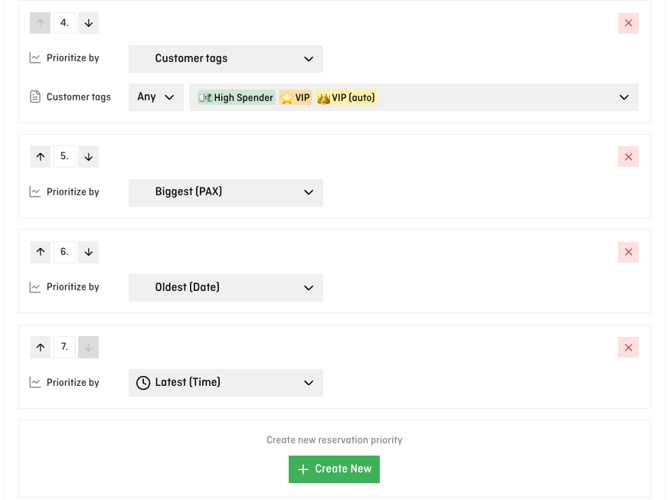
Scroll to the Reservation Priorities section
-
Deactivate individual standard priorities if needed
-
Click Create new
-
Select the desired prioritisation criterion
-
Arrange the priority in the correct order
-
Save your changes
⚠️ Attention:
The order matters. The rule at the top always has the highest priority.
Practical examples
Example 1: Prioritising VIP guests
-
Standard “Largest group” disabled
-
Standard “Earliest start time” active
-
Custom priority: Guest tag “VIP”
→ Earlier start times are considered first, followed by VIP reservations.
Example 2: Securing longer stays
-
Standard priorities disabled
-
Custom priority: Longest reservation duration first
→ Reservations with a longer duration are placed first during reassignment.
Typical questions & pitfalls
Do these priorities apply to every new reservation?
No. They only apply when reservations are reassigned or moved.
Can I combine multiple custom priorities?
Yes. They are evaluated from top to bottom.
What happens if no priorities are active?
The system uses a neutral base logic to place all reservations as sensibly as possible.
💡 Tip:
Keep your prioritisation rules simple and intentional. Too many rules can make the behaviour hard to understand.