
With the marketing email, you can contact guests once after their visit, for example to share offers, promote upcoming events, or invite them to visit again.
Important: The marketing email is only sent to guests who have opted in to newsletter communication. Only one marketing email can be sent automatically per reservation.
- Set up the marketing email
- Enable marketing emails per shift
- When is the marketing email sent?
- When is no marketing email sent?
- Examples
Set up the marketing email
Go to:
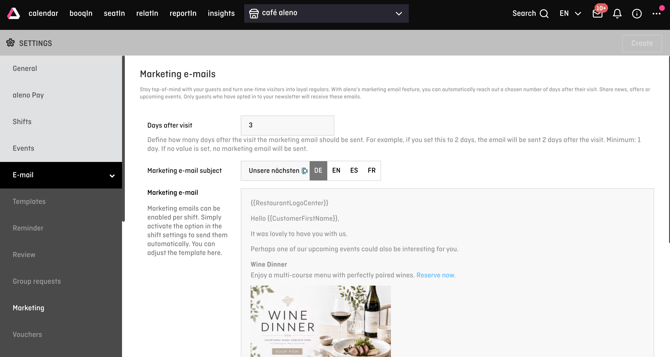
Settings → Email → Marketing
Here you can configure the following fields:
Days after the visit
Define how many days after the guest's visit the marketing email should be sent.
Please note:
- Minimum: 1 day
- Only whole numbers are allowed.
- If no value is entered, no marketing email will be sent.
Marketing email subject
Define the subject line that your guests will see in their inbox.
Examples:
- We're glad you visited us
- A small thank you for your visit
- We look forward to welcoming you again
Marketing email
Here you can customise the content of the email.
You can freely design the text and use placeholders as usual, for example for the guest's name or restaurant information..
Enable marketing emails per shift
The marketing email must also be enabled in the respective shift.
Go to:
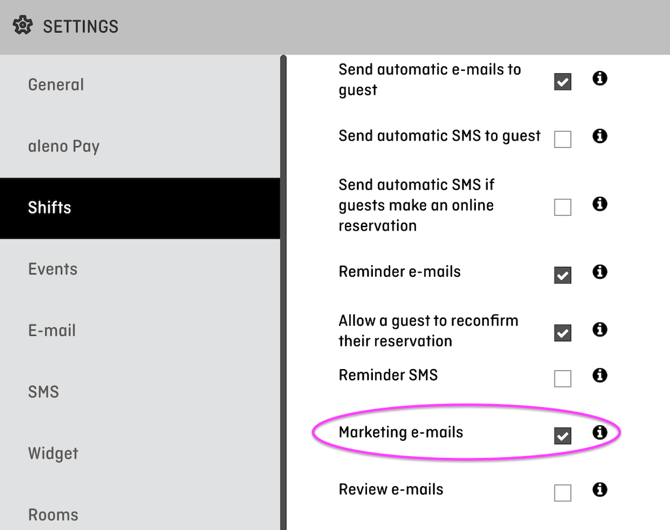
Settings → Shifts → Open the desired shift
Enable the Marketing emails option.
Only if this option is enabled for the shift can a marketing email be sent after a visit in that shift.
When is the marketing email sent?
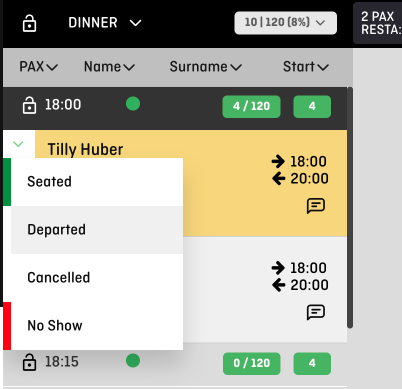
The marketing email is sent after a guest's visit once the reservation has been marked as Departed.
The sending time depends on the number of days you define in the settings.
Example:
If you enter 2 days after the visit, the marketing email will be sent 2 days after the guest's visit.
The sending process is checked automatically in the background. Therefore, the email may not be sent at the exact minute.
When is no marketing email sent?
The marketing email will not be sent if:
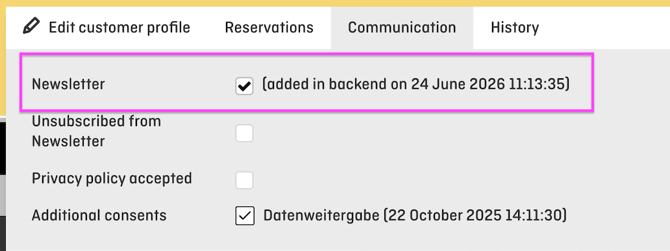
- the guest has not opted in to newsletter communication
- no value has been entered for Days after the visit
- the marketing email is not enabled for the shift
- the reservation has not been marked as Departed
- the guest is excluded through a setting or a guest tag
Exclude hotel guests and guest tags
In the shift settings, you can define whether certain guests should be excluded from receiving marketing and review emails.
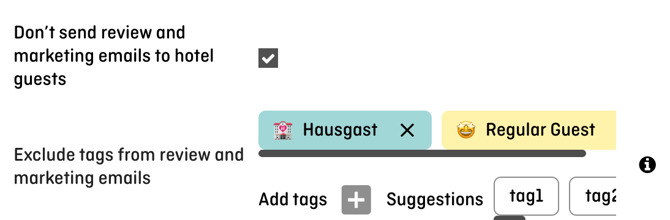
Do not send marketing and review emails to hotel guests
If this option is enabled, hotel guests will not receive marketing or review emails.
Exclude guest tags
You can exclude specific guest tags from receiving these emails.
Examples:
- VIP
- Complaint
- No marketing communication
- Internal guest
Guests with an excluded tag will not receive marketing or review emails.
Good to know
Marketing emails and review emails are independent of each other. Both can be triggered after a guest's visit, but they have separate templates and settings.
The marketing email is not a recurring newsletter. It is sent only once per reservation and is designed for targeted communication after a guest's visit.
Examples of marketing emails
Example 1: Invite guests to visit again
Subject: We're glad you visited us
Hello ,
Thank you for visiting us. We hope you had a wonderful time.
We would be delighted to welcome you back soon. Feel free to explore our latest offers and reserve your next table today.
Best regards,
Your team at
Example 2: Promote upcoming events
Subject: Our upcoming events for you
Hello ,
It was lovely to have you with us.
Perhaps one of our upcoming events could also be interesting for you. You can find all current events and special offers on our website.
We look forward to welcoming you again.
Best regards,
Your team at
Example 3: Promote a seasonal offer
Subject: Discover our new seasonal offer
Hello ,
Thank you for your visit.
We would like to introduce you to our current seasonal offer. Whether it's a new menu, a special wine pairing, or limited-time specials, another visit is well worth it.
We look forward to seeing you again.
Best regards,
Your team at