
Overview
Short introduction
The restaurant level forms the foundation of automatic table assignment.
On the shift level, you can refine this setup to better reflect different times of day, service styles, or guest structures.
All existing rules remain visible and available.
You decide per shift how strongly they should be applied and where additional fine-tuning is helpful.
Which settings you can adjust per shift
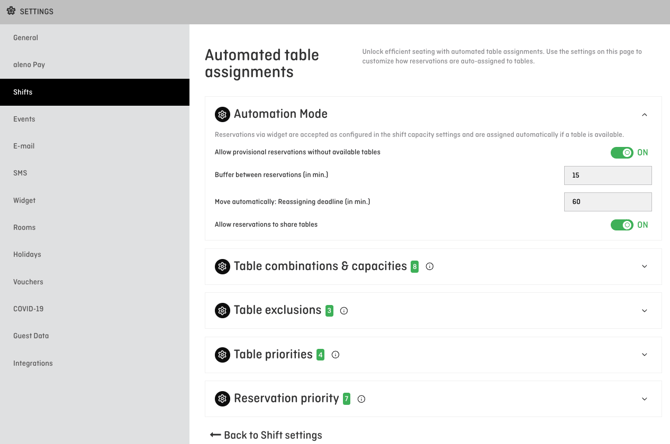
Within a shift, additional settings are available to align the table assignment logic precisely with the specific service.
For these settings, please navigate to Settings > Shifts > Choose one shift > click on 'Edit automated assignement settings':

Typical shift-specific adjustments include:
-
Allow provisional reservations without a free table
Useful when you accept group requests or deliberately work with buffers. -
Define buffers between reservations
Supports a smooth service flow, for example during dinner service or longer stays. -
Set a deadline for automatic reassignment
Controls until when reservations may still be reassigned automatically within the shift. -
Allow shared table usage
Practical for breakfast, lunch, or large communal tables. -
Add shift-specific table capacities, combinations, exclusions or priorities
Enables targeted adjustments without changing the overall restaurant logic.
ℹ️ Note:
These settings apply only to the selected shift and do not affect other shifts.
Using existing rules per shift
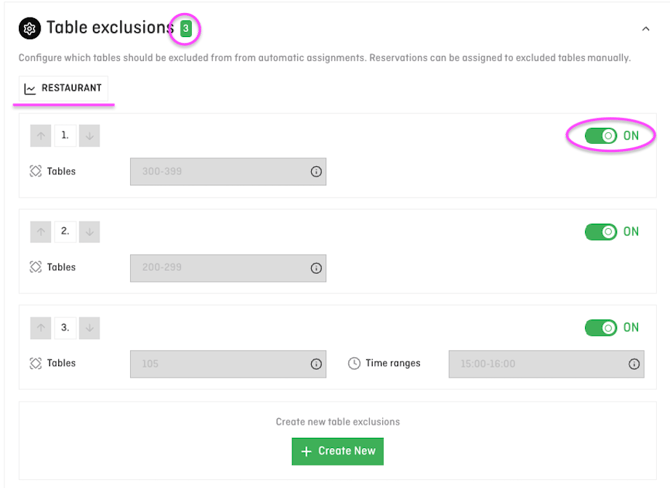
All configurations from the restaurant level are visible and active on the shift level by default.
This means:
-
Each rule appears as a separate entry
-
Rules can be enabled or disabled per shift
-
Additional shift-specific rules can be added where needed
💡 Tip:
This allows you to keep a proven base configuration while adapting it precisely to different service situations.
Typical real-life use cases
Lunch shift with high turnover
-
Shorter guest stays
-
Shorter buffers between reservations
-
Earlier deadline for automatic reassignment
-
Additional table combinations enabled to seat larger groups more flexibly
-
Certain tables or areas deliberately excluded (for example, quieter zones)
Result: High occupancy with fast rotation and a clear room structure.
Dinner service focused on calm and experience
-
Longer guest stays
-
Larger buffers between reservations
-
Later deadline for automatic reassignment
-
Fewer or no table combinations to ensure stability in the table plan
-
Specific tables prioritised (for example window tables first), optionally with conditions such as guest tags
-
No shared table usage
Result: A stable table plan and a calm, well-paced service.
Hotel breakfast shift
-
Shared use of large tables enabled
-
Very short or no buffers
-
Clear and stable table assignment throughout the shift
-
Additional capacities or combinations for larger breakfast tables
-
Few or no table priorities to ensure even distribution
Result: Efficient seating of many guests with maximum overview for the team.
Event or banquet shift
-
Dedicated table capacities and combinations for the event
-
Different or additional table exclusions compared to daily service
-
Different table priorities, such as filling specific areas first
-
Prioritisations with conditions, for example based on group size or defined guest tags
Result: A clear, event-specific setup without affecting regular restaurant operations.
Closing
Shift-specific settings allow automatic table assignment to adapt to your real service routines.
You gain flexibility for different scenarios without rethinking your base configuration or relying on manual adjustments.