
Activate Available Widget Languages
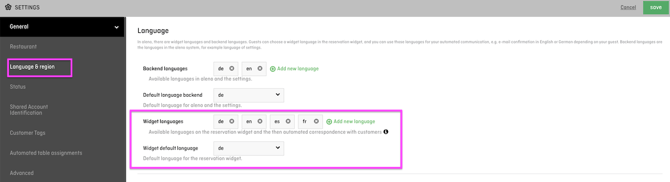
Open Settings > General > Language & Region.
In the Widget languages field, you can select which languages should be available to guests in the reservation widget. Here, you can also define the default language of your widget.
Please note:
If you activate multiple languages, your email templates, SMS templates and custom texts must also be maintained in all languages used.
Open the Widget Directly in a Specific Language
If you want to use a separate widget link for each language on your website, you can add the parameter &locale= to your widget URL.
Examples:
- English:
&locale=en - German:
&locale=de - French:
&locale=fr - Italian:
&locale=it
Use the widget URL available under Menu > Widget Links / Integration and add the required parameter to the end of the URL.
This allows you to link directly to the English widget from the English version of your website and to the German widget from the German version.