
Overview
Where to find the setting
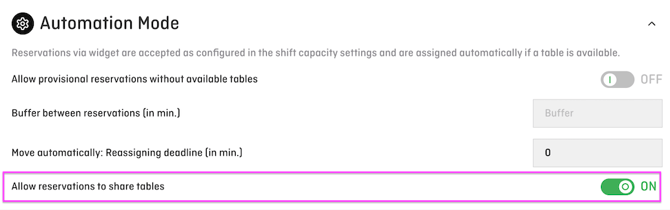
The shared use of tables is configured per shift:
-
Open Settings > Shifts
-
Select the desired shift
-
Scroll to the Automatic Table Assignment section
-
Enable “Allow shared use of tables”
-
Save the shift settings
This setting applies only to the selected shift.
Short clarification
Shared table usage is an option within automatic table assignment.
It controls whether the system is allowed to place multiple reservations at the same table at the same time or with overlapping times.
This feature does not make sense for every restaurant.
However, it can be useful for certain concepts with large tables or communal seating, provided specific conditions are met.
How the setting affects automatic table assignment
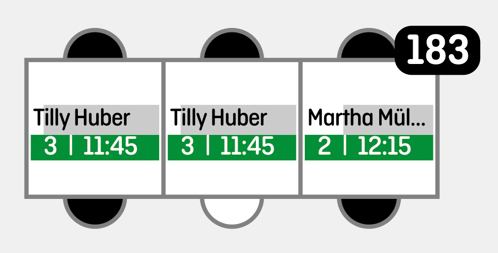
When shared table usage is enabled, automatic table assignment may place multiple reservations at the same table.
Key points:
-
The defined table capacity is always the upper limit
-
Reservations may be placed in parallel or with overlapping times
-
The table plan remains clear and free of conflicts
In daily operations, all reservations remain clearly visible and assigned to the same table without ambiguity.
Distinction from manual placement
Regardless of this setting, you can always manually place multiple reservations at the same table.
The option “Allow shared use of tables” applies only to automatic table assignment and has no effect on manual table placement.
Distinction from double seating
This feature is not intended for double seating.
-
It is not about assigning the same table multiple times one after another
-
It applies only to parallel or overlapping reservations
-
Sequential use of a table is still controlled via stay duration and buffers
Closing
Shared table usage is a specialised setting within automatic table assignment.
When used deliberately, it supports concepts with large or communal tables—without manual intervention and without creating conflicts in the table plan.